Outage

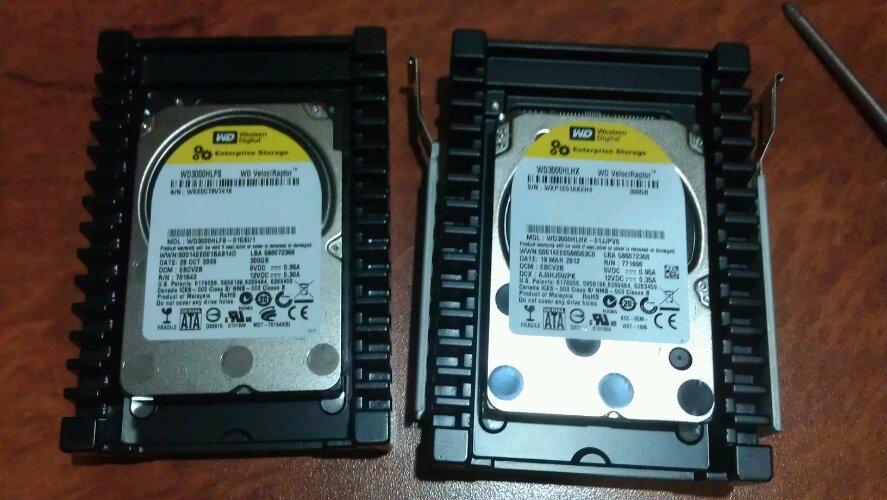
Western Digital VelociRaptor

Well that was fun, not. I’ve just spent the entire evening copying virtual machines between these two drives because the left one decide 2.6 years was enough.  Lucky Linux is smart and gives you enough warning to buy a replacement drive. Though unfortunately my exchange database store became corrupt during the fault and I’ve had to restore my mail plus rejected a heap before I realise what had happened. Oh well at least I didn’t loose the lot.

On a good note, I remembered all the commands for setting up a Linux hard drive off the top of my head. LOL as this website server was one of the ones affected, I had to, where normally I would look at my Adding a HDD to Linux post.

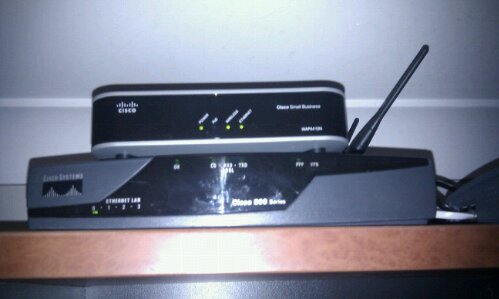
I’ve Purchased My Own Cisco 887-AdvK9

image

Yay!! I finally own one for myself. Good old eBay got me a bargain,  This 877 and a 837 for $280 (including postage) not bad seeing the 877 sell for over $1000 new.  I think the market is getting flooded with these now, as ebay have them for around this price almost all the time now.

I’ve got it to a super stable connection now.  I needed to phone amnet and get my port slowed down, looks like my cheap modem would just settle at a slow speed and would be happy.  Where as the cisco would push for high speed until it started losing packets, but wouldn’t reset.

So I was getting the below errors
*Mar 13 11:21:34.008: atmsar_vc_tx_start(8272D204).
*Mar 13 11:21:34.008: ATM0:atmsar_dequeue_pak, dequeued a pak = 0x82330F70
*Mar 13 11:21:34.008: atmsar_transmit_pak_wrapper: deq(82330F70). vcd: 1.atmsar_transmit_pak_wrapper : encap = Data
*Mar 13 11:21:34.032: ATM0:atmsar_dequeue_pak, dequeued a pak = 0x825E1234
*Mar 13 11:21:34.032: atmsar_transmit_pak_wrapper: deq(825E1234). vcd: 1.atmsar_transmit_pak_wrapper : encap = Data
*Mar 13 11:21:34.036: ATM0:atmsar_dequeue_pak, dequeued a pak = 0x825E2418
*Mar 13 11:21:34.036: atmsar_transmit_pak_wrapper: deq(825E2418). vcd: 1.atmsar_transmit_pak_wrapper : encap = Data

So I was a bit worried for a while that I had brought a dud.  But everything is looking good now.  I’m going to have a bit more of a play with my config then I will post it so every one will know what settings work perfectly on the amnet network.

Goes well with my Cisco WAP4410N wireless access point doesn’t it.

Setup a Cisco Router with POTS on Amnet ADSL

I recently posted a Cisco config on a bridge mode ADSL2+ modem.  Well as I’m a IT Consultant, I get my hands on a fair bit of hardware.  Well this weekend I’ve had a unit that needed testing, as it was failing to transfer data across it’s ADSL link.  Fortunately for me it wasn’t faulty, so I’ve managed to get a working config.

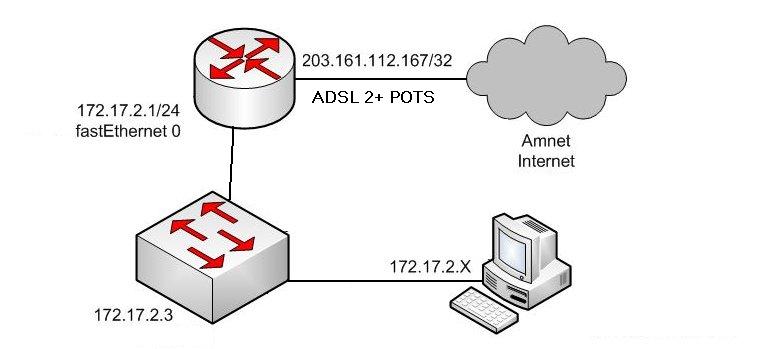
Lanchbury Cisco Layout on Temperary 800 Series Router

This is the more regular setup of a Cisco router, so if your looking for a config for a Amnet connection try the below.  Copy the below text into notepad, edit the {brackets} and then paste it into a Cisco’s Configure Terminal prompt.

no service pad
service timestamps debug datetime msec
service timestamps log datetime msec
service password-encryption
!
hostname {router-name}
!
boot-start-marker
boot-end-marker
!
enable secret {enable-password}
!
no aaa new-model
!
!
!
!
ip cef
ip auth-proxy max-nodata-conns 3
ip admission max-nodata-conns 3
ip domain lookup source-interface Dialer0
ip domain name {local-domain-name}
ip name-server {local-dns-server or 203.161.127.1 and/or 203.153.224.42}
!
vpdn enable
!
vpdn-group pppoe
l2tp tunnel receive-window 128
!
!
!
username {username} privilege 15 secret {user-password}
!
!
archive
log config
hidekeys
!
!
!
!
!
interface ATM0
no ip address
no atm ilmi-keepalive
dsl operating-mode adsl2+
no shutdown
!
interface ATM0.1 point-to-point
description PPPOE WAN Interface
pvc 8/35
pppoe-client dial-pool-number 1
!
!
interface FastEthernet0
description Connected to Switch
no shutdown
!
interface FastEthernet1
!
interface FastEthernet2
!
interface FastEthernet3
!
interface Dot11Radio0
no ip address
shutdown
speed basic-1.0 basic-2.0 basic-5.5 6.0 9.0 basic-11.0 12.0 18.0 24.0 36.0 48.0 54.0
station-role root
!
interface Vlan1
ip address 172.17.2.1 255.255.255.0
ip nat inside
ip virtual-reassembly
!
interface Dialer0
ip address negotiated
ip nat outside
ip virtual-reassembly
encapsulation ppp
dialer pool 1
dialer-group 1
ppp authentication chap callin
ppp chap hostname {amnet-username}@amnet
ppp chap password {amnet-password}
!
ip forward-protocol nd
ip route 0.0.0.0 0.0.0.0 Dialer0
!
no ip http server
no ip http secure-server
ip nat inside source list 1 interface Dialer0 overload
ip nat inside source static tcp 172.17.2.{host} 80 interface Dialer0 80
ip nat inside source static tcp 172.17.2.{host} 443 interface Dialer0 443
{add in any more port forwards you want applied here with the above syntax}
!
access-list 1 permit 172.17.2.0 0.0.0.255
!
control-plane
!
banner motd ^CCC
**************************************************
* Access to authorized personnel only *
**************************************************^C
!
line con 0
exec-timeout 30 0
password {console-password}
logging synchronous
login
no modem enable
line aux 0
line vty 0 4
exec-timeout 30 0
password {remote-password}
logging synchronous
login local
transport input ssh
!
scheduler max-task-time 5000
end

I love my family stickers

image

I applied my family stickers on Saturday of the long weekend, don’t they look awesome!