Allow Cisco iOS Outbound PPTP Through NVI NAT

Howdy all, it’s been a while but I found this and figured it was well worth sharing. I can’t say I found the answer to this issue online, and once I got it it seemed easy which might be why.

To explain the title further, this is a home or small branch office internet connection with no VPN servers. That needs to connect to the office using the old PPTP format VPN. Hense the PPTP connection is going outbound to a remote server.

Yes PPTP is the worst Virtual Private Network anyone can run, and I really shouldn’t be promoting it’s use, but lets say I’m the Cisco tech and the Windows guys don’t agree or something….

So first you want to add “ip nat enable” to the internal and external interfaces, for those of you who know “ip nat inside/outside”, the enable is smart enough to automatically work out which is which.

This won’t break anything, it just telling the interface to use this technology and which interfaces to use.

interface Dialer0
ip nat enable
!
interface Vlan1
ip nat enable
!
interface Vlan2
ip nat enable
!
interface Vlan3
ip nat enable

Now find you existing “ip nat inside source list” line so we can work out what you are allowing

show run | inc ip nat
ip nat inside source list 1 interface Dialer0 overload

show ip access-list 1
10 access-list 1 permit 172.17.0.0 0.0.255.255

Now in my case I’ve got a standard list, allowing PPTP through it, we need to create and change to an extended list. So I will use 190 for NVI, and you need a second one too for Traditional, so I’ll use 191.

What we need to do is block PPTP traffic in the NVI NAT list, but then allow internal IP’s out. So something like

ip access-list extended 190
10 deny tcp any any eq 1723
20 deny gre any any
30 permit 172.17.0.0 0.0.255.255
ip access-list extended 191
10 permit tcp 172.17.0.0 0.0.255.255 any eq 1723
20 permit gre 172.17.0.0 0.0.255.255 any
30 deny ip any any

So this has the setup ready to apply the final commands, this will put NVI NAT as the default and force port 1723 and GRE traffic to use traditional NAT

ip nat source list 190 interface Dialer0 overload
no ip nat inside source list 1 interface Dialer0 overload
ip nat inside source list 191 interface Dialer0 overload

in this order you should only lose a few packet of data to the internet, though if you get a few errors like

Dynamic mapping in use, do you want to delete all entries? [no]: yes
%Error: Dynamic mapping still in use, cannot remove

You can “clear ip nat trans *” and try again. Sometimes it takes a minute or two so you can try again then, otherwise removing the “ip nat inside/outside” command helps clear to issue, though this will increase down time. Another guarantee method is to shut the external interface, that works every time 🙂

So try you PPTP VPN connection now and you should be away.

Now I did say that this site has not services, but just to take this post all the way, if your doing these change to a major site then you would want to adjust your inbound port forwards, you simple want to remove the inside bit

no ip nat inside source static tcp 172.17.2.25 80 interface Dialer0 80
no ip nat inside source static tcp 172.17.2.25 25 interface Dialer0 25
no ip nat inside source static tcp 172.17.2.25 21 interface Dialer0 21
ip nat source static tcp 172.17.2.25 80 interface Dialer0 80
ip nat source static tcp 172.17.2.25 25 interface Dialer0 25
ip nat source static tcp 172.17.2.25 21 interface Dialer0 21

Just don’t change the PPTP port in, that need Traditional NAT

ip nat inside source static tcp 172.17.2.26 1723 interface Dialer0 1723

These changes should then allow you to use the routers external IP address to be NAT hair pin back to the local services.

Hrmm, just found out my VoIP service isn’t working through this change so, standby for more information.

Adaptec RAID controller on VMware ESXi 5.x without a custom build

I’ve built an VMWare ESXi Hypervisor server and my research showed the Adaptec 6805 RAID card as compatible but once I have finished building the system I got to the storage configuration my hard drives failed to appear. Not happy.
Error message
No Storage
So my initial Googleing showed that I needed to create a custom installation media, figuring that seems like a lot of effort for something so small like a driver, so I continued to search and I found a nifty process for an LSI Raid card so then with a tiny bit of adjustments I’ve found the solution, and it was so easy even you can do it. Just follow the below steps:

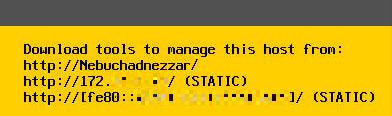
Discover your management IP address, if you don’t know it, it’s displayed on your servers screen.
Host Address

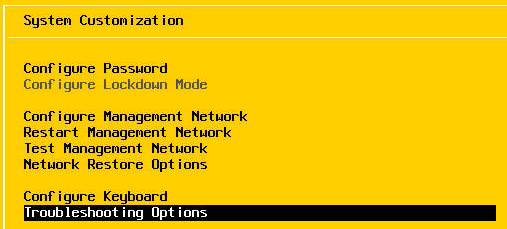
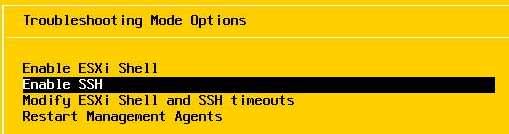
Enable SSH on your ESXi host, within the Troubleshooting Options
Enable Troubleshooting OptionsEnable SSH

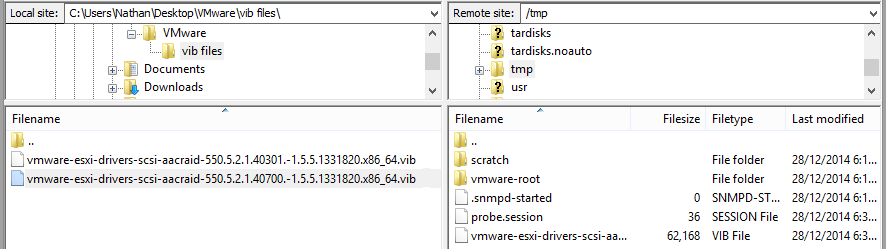
Download your driver files from the Adaptec site or from me directly (if you’ve got the same card) , mine was the vmware-esxi-drivers-scsi-aacraid-550.5.2.1.40700.-1.5.5.1331820.x86_64 so this will be used in further steps below.

Using FileZilla (or another file transfer program that supports SSH transfers) open your host and browse to the /tmp/ directory, and copy these files there.
SFTP InCopy Files

Now PuTTY into your system, and run a command within the /usr/bin directory that will install the vib file (type the bits in black).

login as: root
Using keyboard-interactive authentication.
Password:
The time and date of this login have been sent to the system logs.

VMware offers supported, powerful system administration tools. Please
see www.vmware.com/go/sysadmintools for details.

The ESXi Shell can be disabled by an administrative user. See the
vSphere Security documentation for more information.
~ # cd /usr/bin
/bin # esxcli software vib install -v /tmp/vmware-esxi-drivers-scsi-aacraid-550.
5.2.1.40700.-1.5.5.1331820.x86_64.vib
Installation Result
Message: The update completed successfully, but the system needs to be rebooted for the changes to be effective.
Reboot Required: true
VIBs Installed: Adaptec_Inc_bootbank_scsi-aacraid_5.5.5.2.1.40700-1OEM.550.0.0.1331820
VIBs Removed: VMware_bootbank_scsi-aacraid_1.1.5.1-9vmw.550.0.0.1331820
VIBs Skipped:
/bin # exit

now reboot your ESXi server
restart

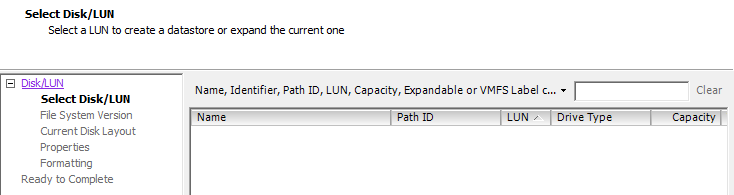
and you’ll find your able to use your local disksStorage

I hope this has been as helpful to you as it has me.  Enjoy.

Feel welcome to shout out below if this has been helpful to you.

Channel 7 Perth Reception Problem

Absolutely no way!

My MythTV server has been running for 5 years perfectly. I gave it a de-dust and rewired a couple of drives on the weekend, and then channel 7 was gone.

Figuring it had to be something I’ve done, I shutdown, reseated the tuners, confirmed wiring connections, removed tv surge protector and still no improvement.

Then I thought to isolate the computer, so I made a cable from the study to the TV, retuned the TV and still no 7, every other channel was perfect.

Ticked that I’ve not watched any news for 3 days, I’ve gone and got a new antenna. Connected it, still the same on both the server and TV. So next I’ve run a temporary cable from the antenna into the TV, and still no 7. At this point, I’ve realized the TV has an analogue tuner. So I’ve scanned for the channels and there, a near prefect analogue 7. How can that be, the digital counter part is on channel 6, only one channel away.I tried increasing and decreasing the signal strength with splitters and amplifiers, in case I was getting too much or too little signal.

So this morning completely stumped I was googling for more ideas, still none the wiser. Getting home, I managed to find a manual tuning screen on the TV which showed the signal of a frequency so started to turn the antenna to find the signal, still nothing.

The top Google search for “channel 7 reception Perth” is http://www.austech.info/digital-terrestrial-television/62851-wierd-channel-7-problem-perth-help-please.html. Well my server has a Antec case with three step speed fans. So I increased the speeds from minimum to medium, and the TV signal bar immediate jumped to 10 out of 10 (from 0). Are you kidding, 5 years and this has never been as issue! Talk about the last thing that I would ever have thought about. Thank you Google!

Create An Anonymous FTP Upload Server

This is the point where I would normally explain what to do, but this guy has done such a good job I thought I should give credit where due.

See his page at http://www.enterprisenetworkingplanet.com/netsecur/article.php/3434071/Build-a-Secure-FTP-Dropbox-with-vsftpd.htm